Fraction exercises with bars and circles
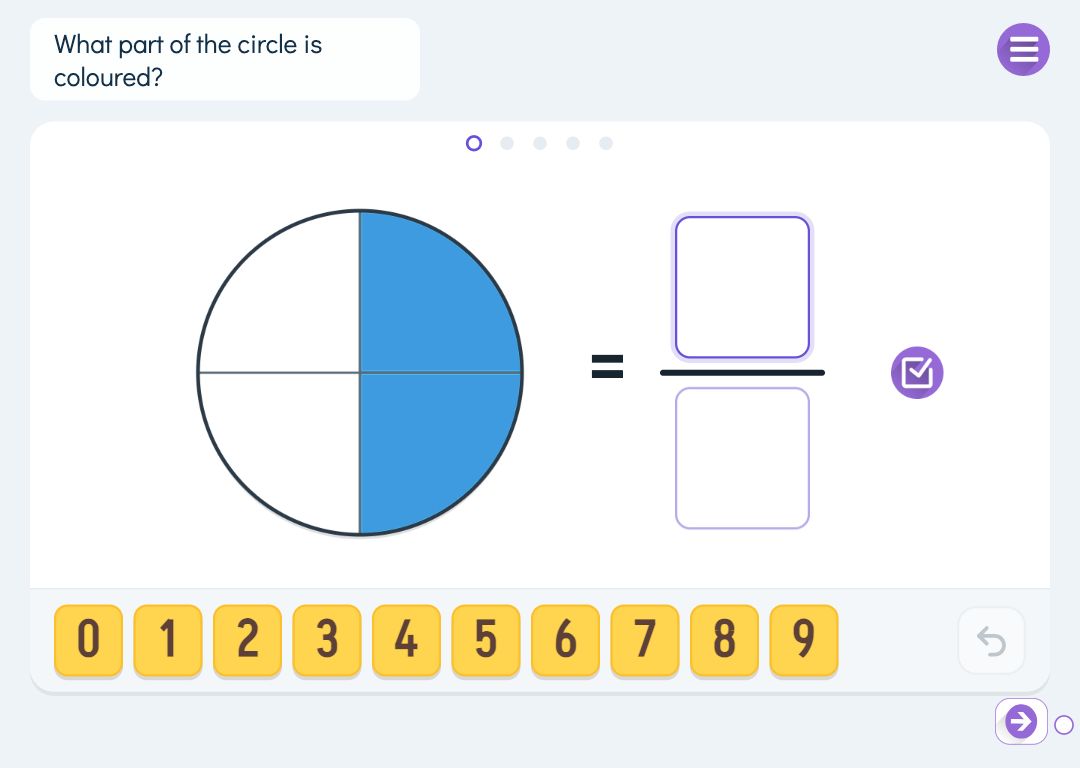
For many pupils a fraction starts out as two numbers stacked on a line. It only gains meaning when they see a whole split into equal parts and can colour, build and compare those parts themselves. In Puro Editor’s fraction exercises pupils work with fraction bars or fraction circles: they name the shaded part, build a fraction from pieces, simplify and find equivalent fractions, compare two fractions and convert between mixed numbers and improper fractions.
You choose the task, the denominators and the number of questions, and Puro generates the questions. You can also type them yourself, one per line. Every answer is checked straight away, and after two wrong attempts the pupil sees the worked answer and the series moves on. If pupils still need the number sense underneath, place value with base-ten blocks works the same way for whole numbers.
Try the exercise
This exercise was made with Puro Editor. Try it yourself – this is exactly what your pupils see.
Five ways to practise fractions
Each page has one task. The task decides what the pupil does on the board.
- Name
- A whole is cut into parts and some are shaded. The pupil writes the numerator and the denominator. An equivalent fraction counts too: if the picture shows 3/6, the answer 1/2 is right.
- Build
- The fraction is shown and the pupil taps unit pieces, quarters for example, into the whole. Tapping a piece on the board takes it back. Any combination with the right total is accepted.
- Equivalent fractions
- The pupil completes an equivalent fraction such as 6/8 = ?/4. You choose whether they fill in the numerator or the denominator; when simplifying you can ask for both, and the answer is then the simplest form. A second whole sits alongside, which the pupil can split into parts and colour as support.
- Compare
- Two fractions sit side by side and the pupil puts <, = or > between them. Each has a whole underneath that the pupil can colour in as a help before answering.
- Convert
- The pupil turns a mixed number into an improper fraction or the other way round, for example 7/4 = 1 3/4. The given number is also drawn as a picture, and you choose the direction: to a mixed number, to an improper fraction, or both.
Mixed numbers up to three wholes
The name, build and compare tasks can include numbers greater than one. The board then shows up to three wholes. In the name task the pupil answers in three boxes: wholes, numerator and denominator. Every correct form is accepted, so the same amount can be written as 1 2/3, 1 4/6 or 5/3.
In the convert task the form is the point of the exercise, so the answer has to be in the form asked for. When you write your own conversions, both sides share a denominator and the right-hand side is the answer, for example 7/4=1 3/4 or 2 1/3=7/3.
Answering with number cards or a pen
In the build task the pupil answers with pieces. For the other tasks you choose how they answer: by dragging number cards into the boxes, or by writing the digits with a pen or a finger. Puro reads the comparison signs <, = and > from their hand-drawn shape, and in card mode they have their own sign tiles.
Puro reads handwritten digits. A digit it cannot make out is never marked wrong; the pupil simply writes it again. A wrong answer is marked in orange, and after two wrong attempts the pupil sees the right answer and moves on to the next question.
By year group
Schemes of work move at different speeds, so treat this as a rough guide.
- Year 2–3
- Name and build fractions with small denominators (2, 3, 4) on circles, where halves and quarters are easy to see.
- Year 4
- Compare fractions and find equivalent fractions by expanding. On bars, 2/4 and 1/2 are visibly the same length.
- Year 5
- Simplify to the simplest form and bring in mixed numbers, starting with naming and building.
- Year 6
- Convert between mixed numbers and improper fractions both ways, and compare mixed numbers with denominators up to 12.
How to create this exercise
- Write the instruction shown above the board (up to 120 characters). You can record or upload audio for it.
- Choose the task: name, build, equivalent fractions (simplify or expand), compare or convert.
- Choose whether the pupil answers with number cards or a pen. In the build task they answer with pieces.
- Choose bars or circles and the denominators, from 2 to 12.
- Choose whether Puro generates the questions or you type them yourself, one per line. For generated questions you set how many (1–10) and, where relevant, mixed numbers, the conversion direction or the simplify and expand options.
- If you like, choose what happens when the task is done: the pupil can move on only after finishing, goes straight to the next page, or sees a message.
Tip: Once pupils can name fractions on circles, give them the same task on bars. Recognising the same fraction in a different shape makes them think about the part in relation to the whole rather than remembering a familiar picture.
Frequently asked questions
- Is Puro Editor free?
- Yes. Puro Editor is free for teachers, including creating and sharing fraction exercises.
- Do pupils need an account?
- No. You publish the exercise and share the link, and pupils open it in the browser without logging in.
- Which devices does it work on?
- It runs in the browser with nothing to install: on tablets (iPad and Android), Chromebooks, computers and interactive whiteboards. In pen mode pupils write the digits with a finger or a stylus.
- Can I set it as homework?
- Yes. Share the link on your learning platform or in a message to families, and pupils do the exercise at home in the browser.
- Is an answer accepted if it is in a different form from the picture?
- In the name task, yes. If the picture shows 3/6, then 1/2 and 2/4 are right too, and with mixed numbers 1 2/3, 1 4/6 and 5/3 are all accepted. In the convert task the answer has to be in the form asked for, because changing the form is the exercise.
- Can I write my own fractions?
- Yes. Type one question per line, for example 3/4 or 1 2/3, 2/3?3/4 for comparing and 6/8=3/4 for equivalent fractions. Denominators can be 1–12, with up to 20 lines. The editor shows any lines it cannot understand and leaves them out.
- What happens when a pupil gets it wrong?
- The wrong answer is marked in orange and the pupil can try again. After two wrong attempts they see the right answer and the series continues with the next question.
Subjects: Maths
Want to create your own fraction exercises?
Sign up