Units of measurement: converting with a table
When converting units, pupils often guess how many zeros to add or take away. A conversion table makes the reasoning visible: every unit has its own column, and once the number is written in under the right unit, the answer can be read straight off the column of the unit asked for. In Puro Editor’s units of measurement exercises pupils convert length, mass and volume in exactly this way, one digit at a time.
You choose what is being measured and which units the conversions use, and Puro generates the conversions. You can also type them yourself. The table rests on the same idea as place value: one column to the left is worth ten times as much.
Try the exercise
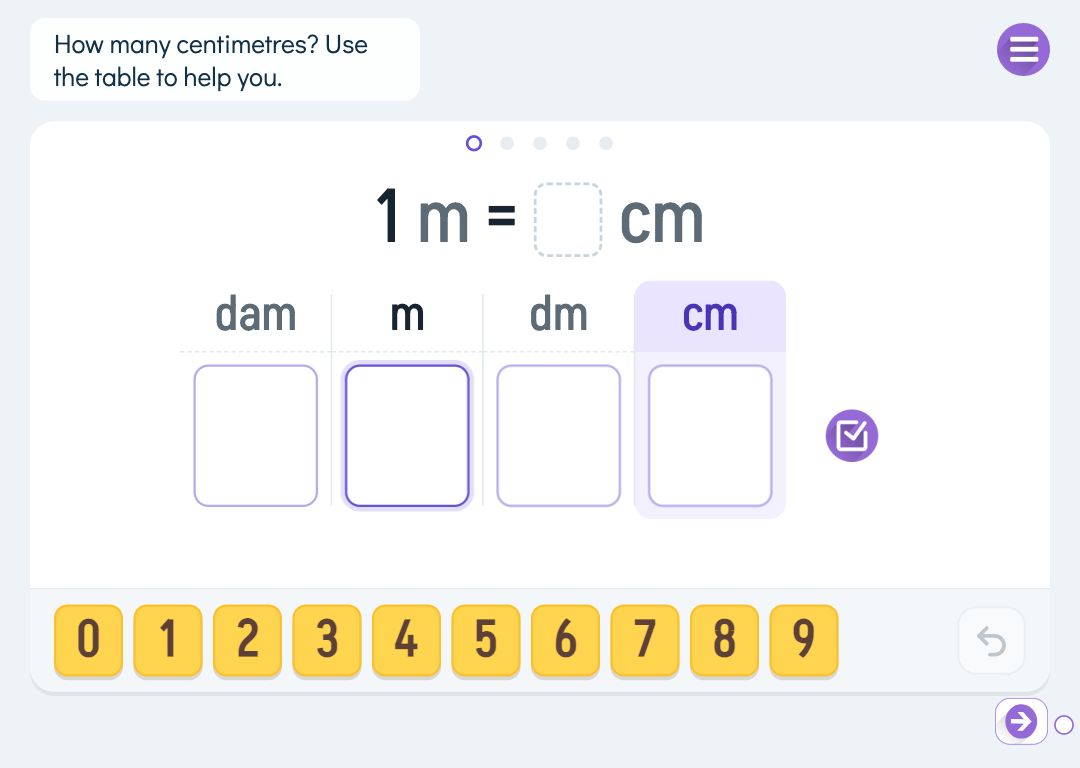
This exercise was made with Puro Editor. Try it yourself – this is exactly what your pupils see.
Length, mass and volume
Each page works on one quantity. You pick the units to practise from it, at least two.
- Length
- km, hm, dam, m, dm, cm and mm. Start with metres and centimetres, say, and add units gradually.
- Mass
- kg, hg, dag, g, dg, cg and mg. Kilograms and grams are plenty to begin with.
- Volume
- l, dl, cl and ml. Litres and millilitres are familiar from the kitchen, which makes them a good place to start.
How pupils convert in the table
The board shows a measurement, such as 350 cm = ? m, and under it a conversion table with a column for each unit. The column of the unit asked for is highlighted, and the given unit’s heading stands out from the rest. The pupil writes the digits of the number in under the given unit and fills in zeros up to the unit asked for. The answer is read up to that column, and the columns after the decimal point that follows it are the decimals.
Pupils answer with number cards or write the digits with a pen or a finger. An empty column in the middle of a number is never marked wrong; the pupil is asked to fill it in first. Wrong digits are marked in orange, and after two wrong attempts the pupil sees the right digits and moves on to the next conversion.
Direction, decimals and your own conversions
When Puro generates the conversions, you choose how many (1–10) and the direction: to a smaller unit (2 m = 200 cm), to a bigger unit (300 cm = 3 m) or both ways. Decimals can be included, giving questions like 3.5 m = 350 cm. The decimal sign follows the story’s language: a point in English, a comma in Finnish, for example.
Your own conversions go one per line: the measurement, an equals sign and the unit to convert to, for example 1 km = ? m or 3.5 km = ? m. You can add up to 20 lines, and the editor shows any it cannot understand.
By year group
Schemes of work move at different speeds, so treat this as a rough guide.
- Year 3
- Convert to a smaller unit with whole numbers: metres to centimetres, litres to millilitres, kilograms to grams.
- Year 4
- Convert both ways and use more units, such as km, m, cm and mm.
- Year 5–6
- Bring in decimals. The table shows where the decimal point goes when the unit changes.
How to create this exercise
- Write the instruction shown above the board (up to 120 characters). You can record or upload audio for it.
- Choose whether the pupil answers with number cards or a pen.
- Choose what is measured: length, mass or volume.
- Pick the units practised on the page (at least two).
- Choose whether Puro generates the conversions or you type them yourself, one per line. For generated conversions you set how many, the direction and decimals.
- If you like, choose what happens when the task is done: the pupil can move on only after finishing, goes straight to the next page, or sees a message.
Tip: Start with two neighbouring units and conversions to the smaller one. Once pupils can see in the table why a metre becomes a hundred centimetres, add more units and only then change direction.
Frequently asked questions
- Is Puro Editor free?
- Yes. Puro Editor is free for teachers, including creating and sharing units of measurement exercises.
- Do pupils need an account?
- No. You publish the exercise and share the link, and pupils open it in the browser without logging in.
- Which devices does it work on?
- It runs in the browser with nothing to install: on tablets (iPad and Android), Chromebooks, computers and interactive whiteboards. In pen mode pupils write the digits with a finger or a stylus.
- Can I set it as homework?
- Yes. Share the link on your learning platform or in a message to families, and pupils do the exercise at home in the browser.
- Which units are included?
- For length km, hm, dam, m, dm, cm and mm; for mass kg, hg, dag, g, dg, cg and mg; for volume l, dl, cl and ml. Tonnes and hectolitres are not included.
- Is a missing zero marked wrong?
- No. If a digit is missing in the middle of the number or the column of the unit asked for is empty, the column is marked to be filled in and the answer is not treated as wrong.
- Can I make several pages on the same topic in one go?
- Yes. When you create a new story, choose a ready-made unit and then Math tool. You pick the quantity and the units, and Puro creates pages to explore, practise, apply and review: first conversions to a smaller unit, then to a bigger one, and finally both ways.
Subjects: Maths
Want to create your own units of measurement exercises?
Sign up