Mental maths practice with handwritten answers
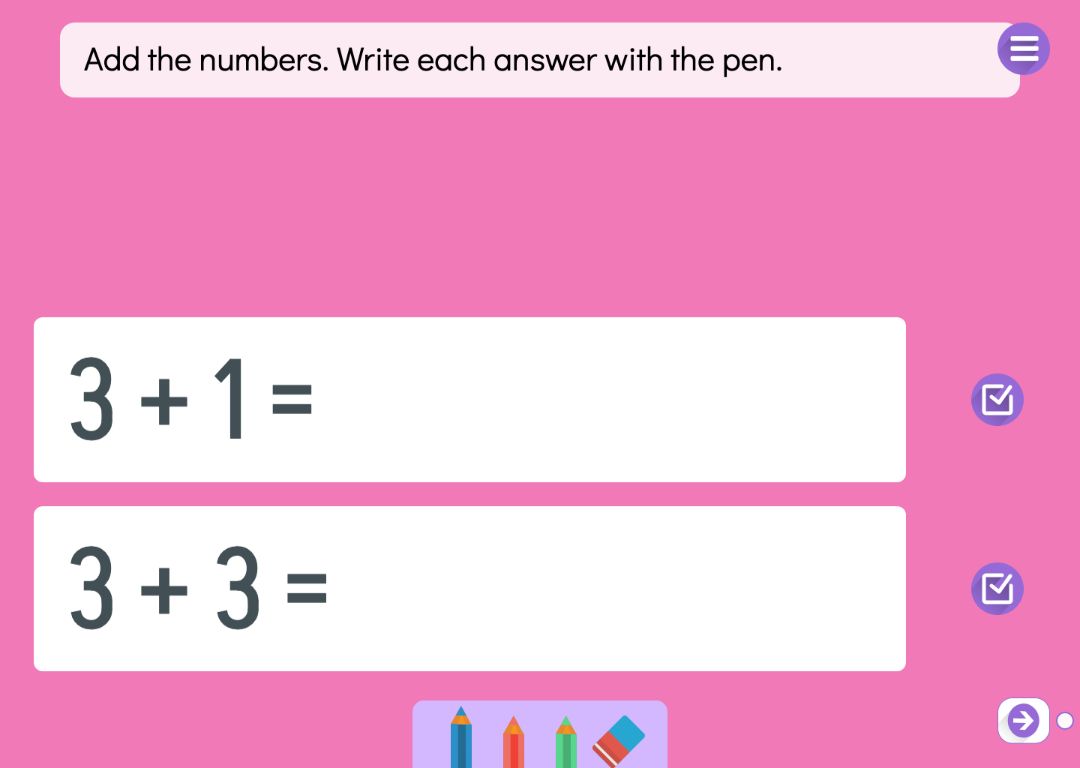
Mental maths builds number sense and fluency. The pupil works out an addition, subtraction, multiplication or division in their head and writes the answer after the equals sign with a finger or a stylus, just as in an exercise book. Because the answer is written rather than picked from options or dragged into place, there is nothing to guess, and the thinking stays with the pupil.
A series holds 3–10 calculations that Puro draws from the number ranges you set. The calculations stay the same when the pupil comes back to the page, and so do the answers they have written. One or two calculations are shown at a time, and the page arrows move on through the series. For sums worked in columns, use column addition instead.
Try the exercise
This exercise was made with Puro Editor. Try it yourself – this is exactly what your pupils see.
Two ways to check the answer
For each series you choose how the pupil’s handwritten answer is checked.
- Self-check
- The pupil writes the answer and taps the check button, and the correct answer appears. They compare it with their own. This keeps their attention on their own working rather than on a right-or-wrong mark.
- Puro reads the handwriting
- Puro recognises handwritten digits once the pupil stops writing. A correct answer gets a green tick. A wrong one gets an orange frame, and the pupil corrects it. If an answer is read as wrong five times, Puro shows the correct one so that nobody gets stuck.
What a series can practise
- The four operations and times tables
- Addition, subtraction, multiplication and division. Each number gets a range or a fixed value. Fix one factor at 7 and the series practises the seven times table.
- Missing number
- Hide one of the numbers and show the answer, as in 3 × _ = 21. The pupil writes the missing number in the gap.
- Three numbers and the order of operations
- A calculation with three numbers can use two different operations. In step-by-step mode the pupil first chooses which pair to work out, and only a choice that follows the order of operations is accepted.
- Counting pictures
- Additions and subtractions with small numbers can show pictures next to the numbers for the pupil to count. You choose the picture from the Puro image library.
A pen for rough work too
You can allow free drawing on the page. The pupil can then draw outside the calculations, for example circling objects in the background picture into groups to help with counting. You choose the pen colours, and an eraser is always included.
When the series is done, the page can move on to the next page or show a message, with sound if you like. You can also lock the way forward until every calculation has been answered.
How to create this exercise
- Choose Arithmetic as the page type.
- Write the instruction for the pupil, such as “Work it out and write the answer”. You can record it or upload it as an audio file.
- Choose whether each calculation has two or three numbers and whether to show counting pictures.
- Pick the operation and give each number a range or a fixed value. If you like, hide one number or limit the size of the answer.
- Choose how many calculations the series has (3–10) and whether one or two are shown at a time.
- Choose how answers are checked, which pen colours the pupil gets and whether free drawing is allowed.
- Decide what happens when the series is done, and choose the page background.
Tip: When the goal is fluency, keep the series short and the number range familiar. Five successful calculations motivate more than ten where half are out of reach. Widen the range on the next page once the pupil is confident.
Frequently asked questions
- Is Puro Editor free?
- Yes. Puro Editor is free for teachers, including creating and sharing mental maths series.
- Do pupils need an account?
- No. You publish the activity and share the link, and pupils open it in the browser without signing in.
- Does it work on an interactive whiteboard, an iPad and with a stylus?
- Yes. It runs in the browser with nothing to install, on tablets (iPad and Android), Chromebooks, computers and interactive whiteboards. Answers can be written with a finger, a stylus or a mouse.
- Can I set it as homework?
- Yes. Share the link on your school’s learning platform or by email, and pupils do the calculations at home in the browser.
- Can Puro read handwritten numbers?
- Yes, when you choose handwriting as the way to check. Puro reads the digits once the pupil stops writing and marks a correct answer with a green tick. Reading handwriting can occasionally go wrong, so the correct answer is shown after the fifth wrong reading at the latest.
- Can I use it for times tables practice?
- Yes. Choose multiplication, give one number a fixed value such as 6 and the other a range of 1–10. The series then consists of six times table questions.
- Do the calculations change when a pupil comes back to the page?
- No. They are drawn once, and when the pupil returns, the same calculations and their written answers are still there.
Subjects: Maths
Do you want to create your own mental maths series?
Sign up