Place value with base-ten blocks
Understanding place value starts with seeing what a digit’s position means: in 34 the 3 is three tens and the 4 is four ones. In Puro Editor’s place value exercises pupils build numbers from base-ten blocks, the digital version of Dienes equipment. A small cube is a one, a rod is a ten, a flat is a hundred and a large cube is a thousand, and each has its own column on the board.
Pupils either build the number shown from blocks or write the number the blocks show. You choose the columns and the number range, and Puro generates the numbers, so different pupils get different numbers. Once place value is secure, the same thinking carries into column addition: a carried digit is simply an exchanged ten.
Try the exercise
This exercise was made with Puro Editor. Try it yourself – this is exactly what your pupils see.
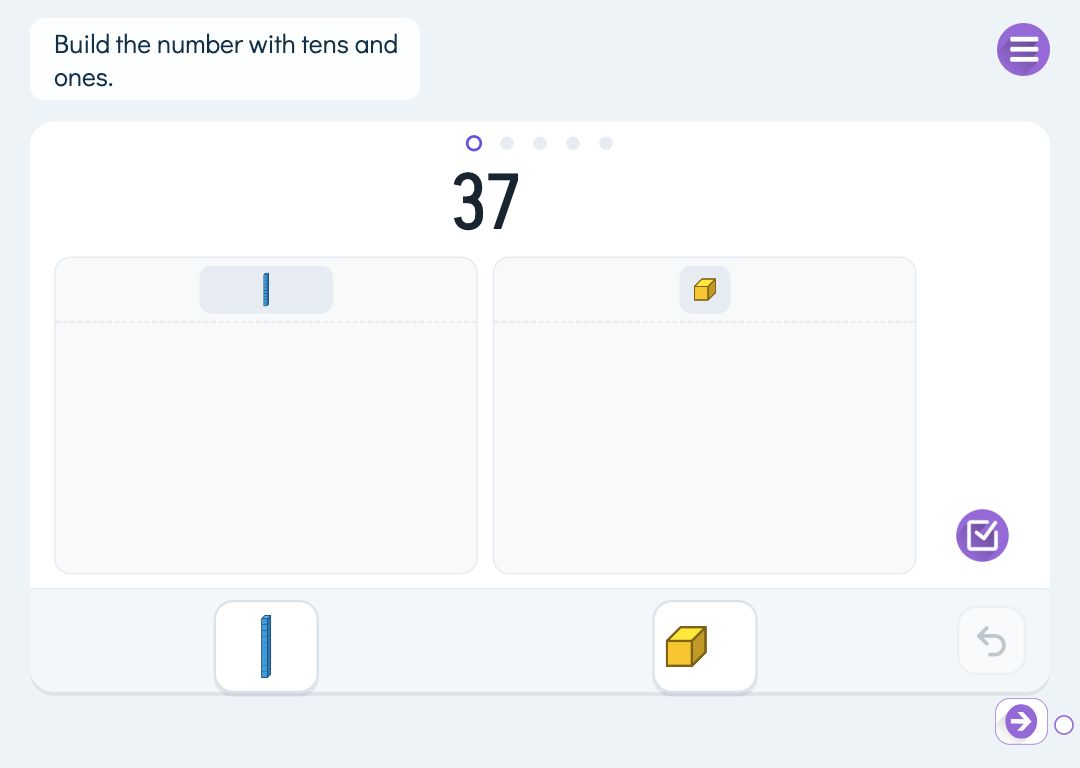
Build it or write it
Each page has one of two tasks. They practise place value in opposite directions.
- Build
- The number is shown and the pupil builds it from blocks. Tapping below a column adds a block, and dragging a block out of its column takes it away. A whole column can be cleared at once, and the undo button brings back the previous step.
- Write
- The blocks are shown and the pupil writes a digit under each column. You choose whether they answer with number cards or write the digits with a pen or a finger.
Exchanging: one ten for ten ones
In the build task, blocks can be exchanged just as with physical equipment. When the pupil taps a ten, it breaks into ten ones, and when a column holds ten blocks they can be bundled into one block in the next column. The same works for hundreds and thousands. Exchanging is the groundwork for carrying and borrowing, so pupils see where a carried digit comes from.
By default a correct answer has no more than nine blocks in any column. To practise partitioning numbers in different ways, switch this off: 2 hundreds, 14 tens and 7 ones then count as 347. Exchanging itself can be switched off too.
Number range and your own numbers
There are two to four columns: tens and ones, with hundreds, or with thousands, so the largest number is 9999. Set the smallest and largest number and how many questions (1–10), and Puro picks numbers from that range.
You can also type the numbers yourself, one per line, up to 20. Every pupil then gets the same numbers, which suits going through the task together on the classroom board.
By year group
Schemes of work move at different speeds, so treat this as a rough guide.
- Year 1–2
- Tens and ones, with a range such as 10–99. Start with building, where pupils see that a ten is ten ones.
- Year 3
- Add hundreds. Use the write task to go from blocks to numerals, and exchanging as the basis for crossing tens.
- Year 4
- Add thousands. Switch off the nine-block limit when you work on partitioning numbers in different ways.
How to create this exercise
- Write the instruction shown above the board (up to 120 characters). You can record or upload audio for it.
- Choose the task: build the number from blocks, or write the number the blocks show. For the write task, also choose whether the pupil answers with number cards or a pen.
- Choose the columns: tens and ones, with hundreds, or with thousands.
- Choose whether Puro generates the numbers or you type them yourself. For generated numbers, set the smallest and largest number and how many questions.
- For the build task, choose whether pupils can exchange blocks and whether a correct answer may have more than nine blocks in a column.
- If you like, choose what happens when the task is done: the pupil can move on only after finishing, goes straight to the next page, or sees a message.
Tip: Follow a build page straight away with a write page on the same number range. When pupils go from number to blocks and back again, place value does not stay a trick that only works in one kind of task.
Frequently asked questions
- Is Puro Editor free?
- Yes. Puro Editor is free for teachers, including creating and sharing place value exercises.
- Do pupils need an account?
- No. You publish the exercise and share the link, and pupils open it in the browser without logging in.
- Which devices does it work on?
- It runs in the browser with nothing to install: on tablets (iPad and Android), Chromebooks, computers and interactive whiteboards. Blocks are added by tapping, so it works well on touch screens and as a whole-class activity on the board.
- Can I set it as homework?
- Yes. Share the link on your learning platform or in a message to families, and pupils do the exercise at home in the browser.
- How big can the numbers be?
- Up to 99 with two columns, 999 with three and 9999 with four. You can narrow the range further with the smallest and largest number.
- What happens when a pupil gets it wrong?
- Columns or boxes that do not match are marked in orange and the pupil can correct them. After two wrong attempts the board shows the model answer and the series continues with the next number.
- Can I make several pages on the same board in one go?
- Yes. When you create a new story, choose a ready-made unit and then Math tool. You pick the columns and the number range, and Puro creates pages to explore, practise, apply and review. Before creating the story you can preview each page, leave pages out or swap some for another option.
Subjects: Maths
Want to create your own place value exercises?
Sign up