An educational running game with Teemu the Tiger
In the running game, Teemu the Tiger runs along a sandy jungle path and wooden signs come towards him, each with a word, a picture or both. The pupil steers Teemu into the right cards and dodges the wrong ones by changing lane or jumping over them. Hitting a wrong card costs a heart. The run ends at the finish line or when the hearts run out, and the pupil can go again straight away.
You decide which cards are collected and which are dodged: birds and mammals, nouns and verbs, or odd and even numbers. Pupils have to recognise each card on the move, so familiar vocabulary gets lively revision. They can first meet the same words in a memory game and sort them calmly in a sorting activity.
Try the exercise
This exercise was made with Puro Editor. Try it yourself – this is exactly what your pupils see.
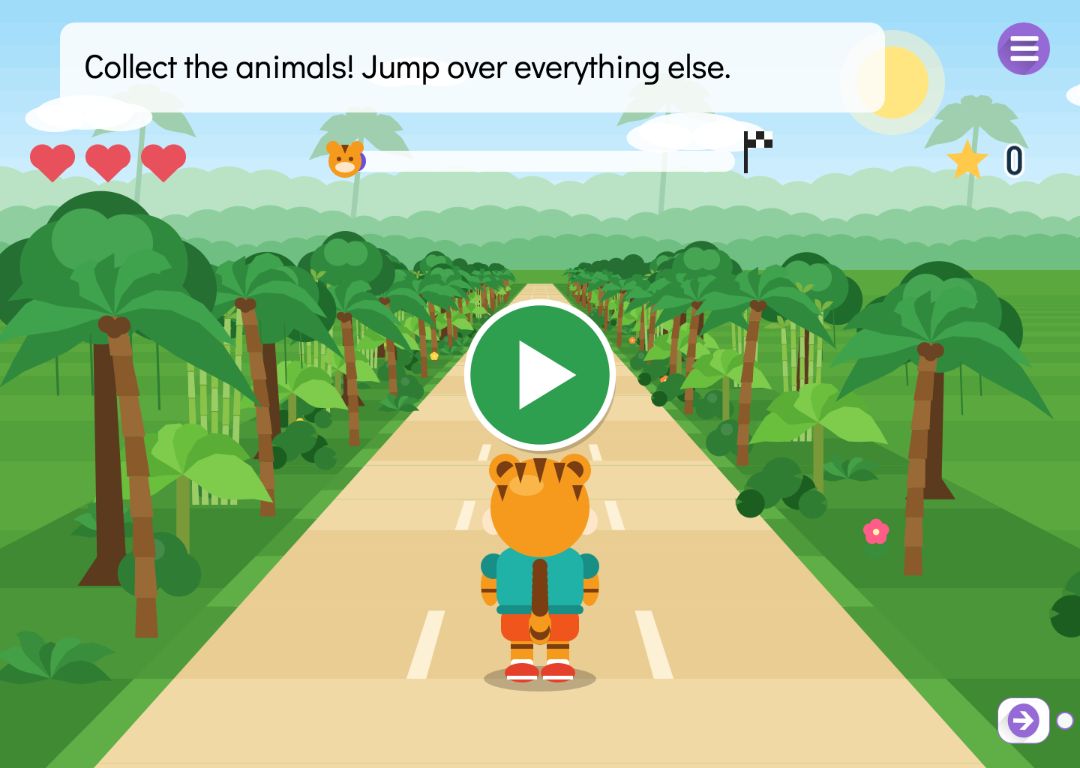

How pupils steer Teemu
The game works with touch and keyboard, and there is no written text in it apart from the words on the cards.
- Changing lane
- The pupil swipes sideways, taps to the left or right of Teemu, or uses the arrow keys. A right card is collected by running into its lane.
- Jumping
- Swiping up, tapping Teemu or pressing the space bar makes him jump. Some cards hang high up from jungle vines, and a right card up high can only be collected with a jump.
- Obstacles
- Fallen logs and rocks also lie on the path, to be jumped or dodged. The game places them itself. Hitting one costs a heart, but obstacles do not count towards the score.
- Feedback without words
- Each run starts with a countdown, collected cards fly to the counter and a progress bar shows how far it is to the finish.
Cards made of words and pictures
You add the cards to two lists: ones to collect and ones to dodge. A card is a word, a picture from the Puro picture library, or both. When you pick a picture, the editor looks up its word in the concept library in the language of the story, and you can edit it. A word can be up to 24 characters long, and a game holds up to 16 cards.
Picture cards work for children who cannot read yet: leave the word out or hide it under the picture, and the card shows the picture alone. The game needs at least one card to collect and one to dodge. Until then the page is saved without the game, and the form tells you so.
A pace that suits your class
The game settings are chosen from ready-made options.
- Length of the run
- 20, 30, 45, 60 or 90 seconds.
- Hearts
- One to five, three by default. When the hearts run out, Teemu sits down feeling dizzy and the pupil can try again.
- Speed
- Slow, medium or fast. You also choose whether the speed rises towards the finish.
- Lanes
- Two, three or four. With two lanes the pupil has less to keep track of at once.
When the game is done
The game is done once Teemu crosses the finish line. You decide what happens then.
- Lock the way forward
- The pupil can move to the next page only after reaching the finish.
- Move on or show a message
- Reaching the finish can take the pupil straight to the next page, or show a message such as “Well done!” and play a sound.
How to create this exercise
- Choose Running Game as the page type and write the instruction — “Collect the animals! Dodge or jump over the others.”, for example. You can record it too.
- Add the cards to collect: type a word or pick a picture from the Puro picture library.
- Add the cards to dodge in the same way. A game can have up to 16 cards in total.
- Choose the length of the run, the number of hearts, the lanes and the speed.
- Choose what happens when the game is done and, if you like, add background music.
Tip: Pick cards to dodge that are close to the right ones. If pupils are collecting birds, make the cards to dodge other animals rather than objects. That way they have to think about which group each card belongs to, and a quick glance is not enough.
Frequently asked questions
- Is Puro Editor free?
- Yes. Puro Editor is completely free for teachers, including making and sharing running games.
- Do pupils need an account?
- No. You publish the game and share the link, and pupils open it in the browser without logging in.
- Does the running game work on tablets and interactive whiteboards?
- Yes. It runs in the browser with nothing to install, on tablets (iPad and Android), Chromebooks, computers and interactive whiteboards. On a touch screen Teemu is steered by swiping or tapping; on a computer the arrow keys and the space bar work too.
- Can I set it as homework?
- Yes. Share the link on your learning platform, class page or by email, and pupils play at home in their browser.
- Can I upload my own pictures?
- No. Card pictures come from the Puro picture library, and the editor suggests a word for each one. Word cards can say anything you like, as long as it fits in 24 characters.
- What happens when the hearts run out?
- The run ends, Teemu sits down feeling dizzy and a replay button appears. If you have locked the way forward, the pupil can move on only after reaching the finish.
- Is the running game part of any ready-made units?
- Yes. When you create a new story you can start from the ready-made unit Vocabulary practice or Concept sorting. Both include a running game in which pupils collect the words of one group and dodge the rest.
Subjects: Games
Want to make your own running game?
Sign up