Create interactive sorting activities
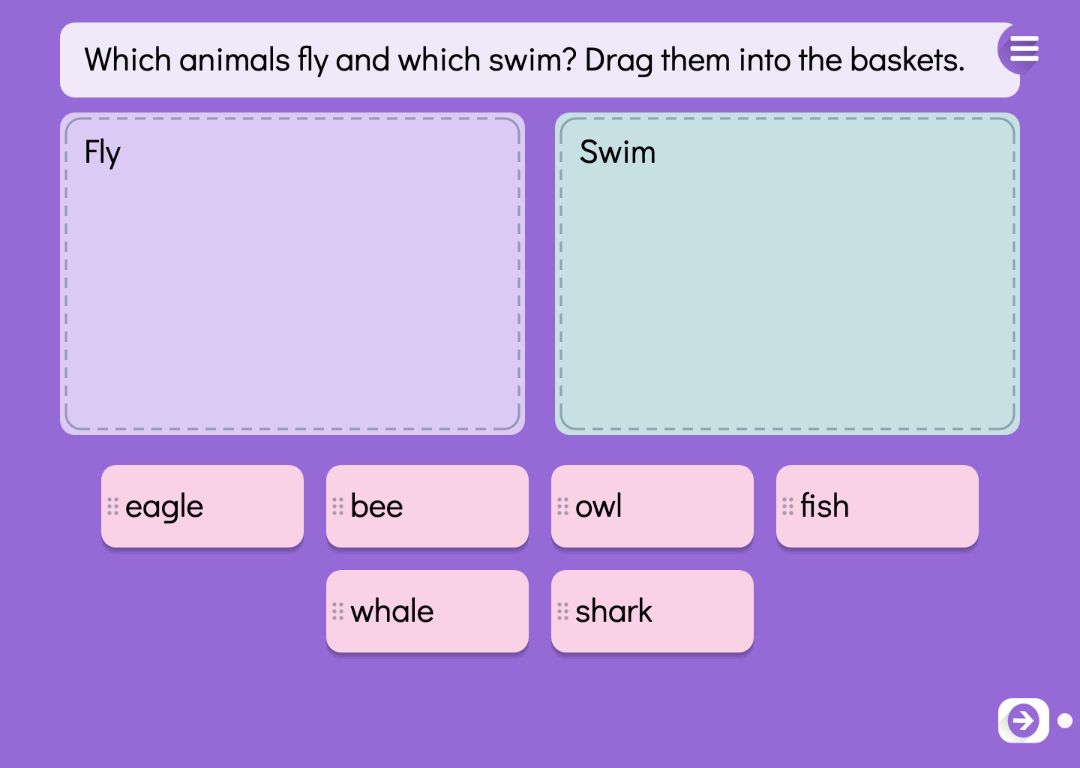
A sorting activity has two or three named baskets and up to eight words. The pupil drags each word into the basket where it belongs: mammals and birds, nouns and verbs, odd and even numbers. Words can be moved around freely, and the check button appears once every word is in a basket.
Sorting trains pupils to tell concepts apart. To place a word they need to know what separates the groups — recognising the word on its own is not enough. For looking at single concepts more closely there are concept cards, and for questions with one right answer, multiple choice questions.
Try the exercise
This exercise was made with Puro Editor. Try it yourself – this is exactly what your pupils see.

Checking that leads to correcting
When the pupil presses the check button, words in the right basket lock with a tick. Words in the wrong basket shake and go back to where they started, and the pupil has another go at them. The feedback is shown with marks and movement rather than words.
Because the check waits until every word has been placed, the pupil commits to a decision on each word before getting any feedback. They cannot simply try words one at a time and see what sticks.
Two baskets or three
You choose the number of baskets in the page type menu, and you can add or remove a basket in the form later.
- Two baskets
- A clear contrast, such as living and non-living, or singular and plural. A good start when sorting is a new way of working for the class.
- Three baskets
- A third basket brings in the borderline cases and calls for finer distinctions — mammals, birds and fish, say, or Ancient Greece, Ancient Rome and the Middle Ages.
Foreign languages: Sort the Words
For language teaching there is a variant called Sort the Words. The words are in the language being learned and the baskets are named in the teaching language — English words into the baskets Animals and Food, for example, in a Finnish or Swedish story. You can choose English, Swedish, Finnish, Norwegian, German, French, Italian or Spanish, as long as it differs from the language of the story.
Each word also gets its meaning in the language of the story. Pupils never see the meaning, but it means that only the instruction, the basket names and the meanings are translated with the story, while the words being learned stay as they are.
When the task is done
On every task page you decide what happens once all the words are in the right baskets.
- Lock the way forward
- The pupil can move to the next page only after completing the task.
- Move on or show a message
- A finished task can take the pupil straight to the next page, or show a message such as “Well done!” and play a sound.
- Hint lamp
- After two mistakes a hint lamp can appear. Step by step, it shows which basket the next word belongs in.
How to create this exercise
- Choose Sorting as the page type, with two or three baskets. For a language task, choose Sort the Words and the language being learned.
- Write the instruction — “Sort the words into the right baskets.”, for example — and record it if you like.
- Name the baskets, such as Fruit and Vegetables.
- Write the words and choose the basket each one belongs in. You can have up to eight words.
- Choose what happens when the task is done, and give the page a background colour or image and, if you like, background music.
Tip: Include one or two words that sit close to the line between baskets, like a bat between mammals and birds. Those are the words that make pupils justify their choice, and they make for a good discussion afterwards.
Frequently asked questions
- Is Puro Editor free?
- Yes. Puro Editor is completely free for teachers, including making and sharing sorting activities.
- Do pupils need an account?
- No. You publish the task and share the link, and pupils open it in the browser without logging in.
- Does dragging work on tablets and interactive whiteboards?
- Yes. It runs in the browser with nothing to install, on tablets (iPad and Android), Chromebooks, computers and interactive whiteboards. Words are dragged with a finger, a stylus or a mouse.
- Can I set it as homework?
- Yes. Share the link on your learning platform, class page or by email, and pupils do the task at home in their browser.
- How many baskets and words can a task have?
- Two or three baskets and up to eight words, each belonging to one basket. If you need more words, spread them over several pages.
- What happens when a word is in the wrong basket?
- When the pupil checks, wrong words shake and return to where they started, while the right ones stay locked in their baskets. The pupil then places the returned words again.
- Are there ready-made units with sorting?
- Yes. When you create a new story you can start from a ready-made unit. Vocabulary practice turns 4–8 words with pictures into a memory game, a sorting task, a running game and multiple choice, and Concept sorting compares two or three groups of concepts from the concept library.
Subjects: Reading Languages Science and geography History
Want to make your own sorting activities?
Sign up