Digital book maker for teachers: pages with text, pictures and sound
In Puro Editor a story moves on page by page, and book pages turn it into a book. A book page is a ready-made layout with places for a title, text and pictures. You type the text, drag a picture into the picture slot and record yourself reading, so pupils can read, look and listen.
The book becomes learning material when you add tasks along the way: after a book page there might be a multiple choice question about what pupils have read, or a sorting activity on the concepts in the text. A story holds up to 30 pages, and you share the finished book with pupils as a link.
Try the exercise
This exercise was made with Puro Editor. Try it yourself – this is exactly what your pupils see.
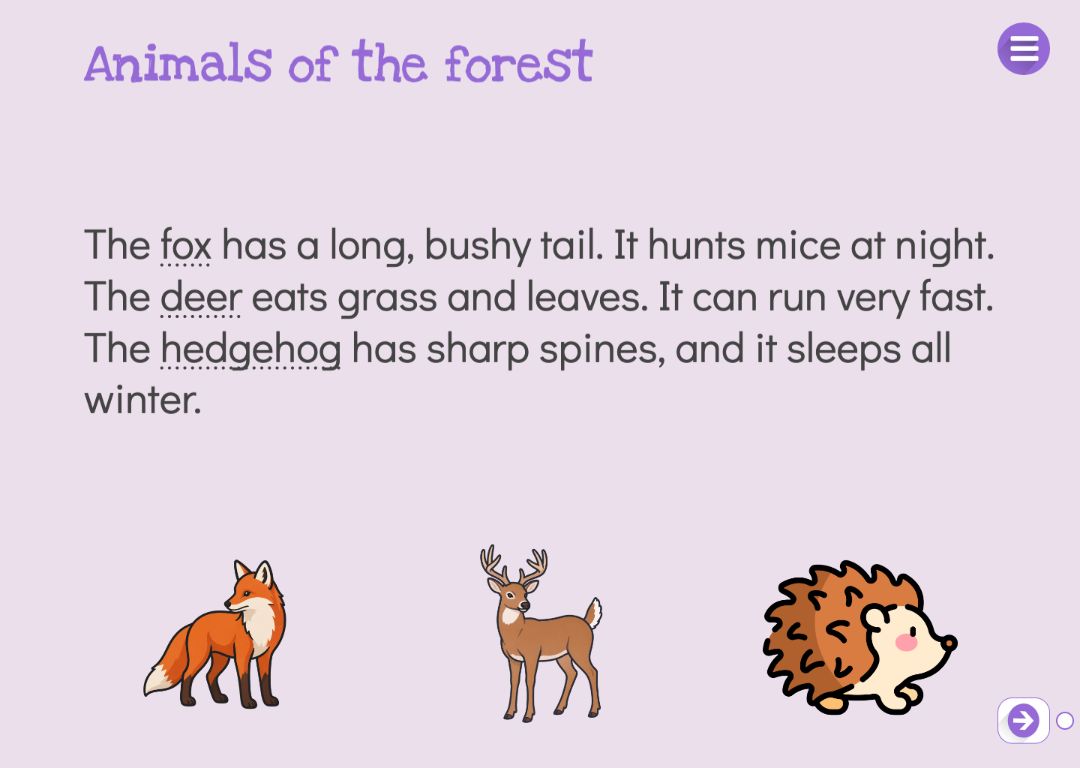
Six layouts
You choose a layout when you add the page. The places come with placeholder text in the language of the story, and everything can be moved, changed or removed, because a book page is an ordinary freestyle page.
- Picture and text side by side
- A title at the top, a picture on the left and text on the right. Good for information text where picture and explanation go together.
- Picture on top, text below
- A large picture with a short text underneath, as in a picture book.
- Full-page picture with a text strip
- The picture fills the page, and the text sits on a strip over the bottom of it.
- Title, explanation and example
- An explanation with a highlighted example box below. Good for introducing a new concept or rule.
- Two columns
- A title and two columns of text side by side, for comparing two things, for example.
- Big text
- One large piece of text in the middle of the page, to open a chapter or introduce a single word.
Picture slots that fit the picture
A picture slot is a box that says “Drag a picture here”. When you drag a picture from the Puro library or from your own images onto it, the picture is fitted into the slot whole and centred, with no resizing by hand.
An empty picture slot is not shown to pupils. In the published story it leaves blank space rather than a broken image, so even an unfinished page looks tidy.
Text pupils can listen to and explore
The text on a book page sits in ordinary text boxes, so every setting of the text tool is available.
- Audio
- Record yourself reading the text or upload an audio file. Pupils can listen while they read.
- Concept links
- Link a word in the text to a concept from the Puro concept library. When the pupil taps the word, a concept card opens with a picture, the word and an explanation. Inflected forms of a word can be linked too.
- Language being learned
- For language teaching, a text box can be set to the language being learned. Pupils see the word or sentence in that language, and only its meaning is translated with the story.
How to create this exercise
- Add a page to the story, choose Book Page as the page type and pick a layout.
- Type the title and text in place of the placeholders.
- Drag a picture from the Puro library or your own images onto the picture slot.
- Record the text or upload an audio file for it in the text tool, and link concepts in the text tool’s advanced settings if you like.
- Add the next pages the same way, with tasks in between. Publish the story and share the link with pupils.
Tip: Keep one idea to a book page: one picture and a few sentences. When the text is short and recorded, early readers can keep up, and a task page straight after shows whether the idea has stuck.
Frequently asked questions
- Is Puro Editor free?
- Yes. Puro Editor is completely free for teachers, including making and sharing books.
- Do pupils need an account?
- No. You publish the story and share the link, and pupils open it in the browser without logging in.
- Which devices can pupils read the book on?
- It runs in the browser with nothing to install, on tablets (iPad and Android), Chromebooks, computers and interactive whiteboards.
- Can I set it as homework?
- Yes. Share the link on your learning platform, class page or by email, and pupils read the book and do its tasks at home in their browser.
- Can pupils make their own books?
- Puro Editor is a tool for teachers: the teacher makes the book, and pupils read it, listen to it and do the tasks. There is no separate book-making mode for pupils.
- Where do the pictures come from?
- From the Puro library or your own images. Your own pictures can be PNG or JPEG files.
- How many pages can a book have?
- A story can have up to 30 pages, including task pages. A longer book can be split into several stories, one per chapter for example.
Subjects: Maths Reading Writing Languages Science and geography History Music and art
Want to make your own digital book?
Sign up