Multiple choice quiz maker with true or false questions
A multiple choice page has one question and two to six answer options, one or more of them correct. The pupil taps an answer and it is checked on the spot: a right option locks with a tick, a wrong one gives a little shake and stays open. A wrong answer is not the end of the task — the pupil keeps going until they find the right one.
The same form also makes True or False pages: a single statement with the options True and False. When pupils need to split several words into groups, sorting activities are the better fit, and for revising vocabulary with pictures there is the memory game.
Try the exercise
This exercise was made with Puro Editor. Try it yourself – this is exactly what your pupils see.
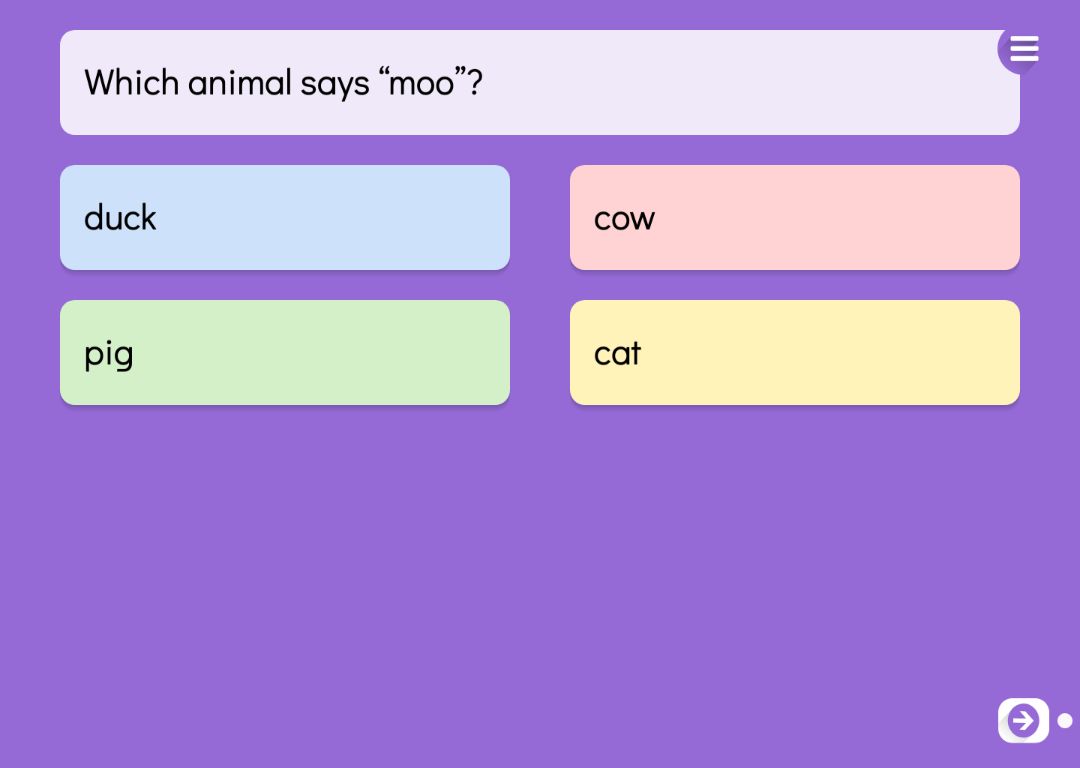

One right answer or several
You tick the correct answers in the form. How many you tick decides how the pupil answers.
- One correct answer
- The tap is the answer, and it is checked straight away. Good for quick recall and a warm-up at the start of a lesson.
- Several correct answers
- The pupil selects every option they think is right and presses the check button. Correct picks lock, wrong ones are released to try again, and the task is done once every correct option has been found. A question like “Which of these are birds?” makes the pupil weigh up every option rather than pick one and move on.
True or false statements
On a True or False page the question is replaced by a statement, such as “A whale is a fish.” The options True and False are filled in for you in the language of the story, and you mark the right one. You can rename the options if you prefer other words. They always stay in the same order, so pupils quickly learn which is which.
Statements work well for tackling common misconceptions. Once the mistaken belief is written down, the pupil has to take a position on it — and the class has a natural moment to talk about why it is wrong.
Foreign languages: Choose the Word
For language teaching there is a variant called Choose the Word. The instruction is in the teaching language — “Choose the word that means dog”, for example — and the options are in the language being learned. You can choose English, Swedish, Finnish, Norwegian, German, French, Italian or Spanish, as long as it differs from the language of the story.
Each option also gets its meaning in the language of the story. Pupils never see the meaning, but it means that only the instruction and the meanings are translated with the story, while the words being learned stay exactly as you wrote them.
When the task is done
On every task page you decide what happens once the pupil has found the right answers.
- Lock the way forward
- The pupil can move to the next page only after completing the task.
- Move on or show a message
- A finished task can take the pupil straight to the next page, or show a message such as “Well done!” and play a sound.
- Hint lamp
- After two mistakes a hint lamp can appear. It fades out wrong options one step at a time and finally shows the right one.
How to create this exercise
- Choose Multiple Choice or True or False as the page type. For a language task, choose Choose the Word and the language being learned.
- Write the question or statement, up to 150 characters. You can record it or upload an audio file so the pupil can listen to it.
- Write the answer options and tick the correct ones. A question can have two to six options.
- For multiple choice, decide whether the options are shuffled. On a True or False page the order always stays the same.
- Choose what happens when the task is done, and give the page a background colour or image and, if you like, background music.
Tip: Build the wrong options from the mistakes your pupils actually make. When the distractors are believable, a right answer shows real understanding rather than a lucky guess.
Frequently asked questions
- Is Puro Editor free?
- Yes. Puro Editor is completely free for teachers, including making and sharing multiple choice questions.
- Do pupils need an account?
- No. You publish the task and share the link, and pupils open it in the browser without logging in.
- Does it work on tablets and interactive whiteboards?
- Yes. It runs in the browser with nothing to install, on tablets (iPad and Android), Chromebooks, computers and interactive whiteboards. Options are chosen with a tap or a mouse click.
- Can I set it as homework?
- Yes. Share the link on your learning platform, class page or by email, and pupils do the task at home in their browser.
- Can a question have more than one correct answer?
- Yes. When you tick more than one correct answer, the pupil selects the options and checks them with a button. The task is complete once every correct option has been found.
- What happens when a pupil gets it wrong?
- The wrong option shakes and stays available, so the pupil can try again. If you switch on the hint lamp, it appears after two mistakes and helps one step at a time.
- Can pupils listen to the question?
- Yes. You can record the question or upload an MP3 file for it, and pupils play it on the page. That makes the task usable for children who are only starting to read.
Subjects: Languages
Want to make your own multiple choice questions?
Sign up