Sentence building with jumbled sentences
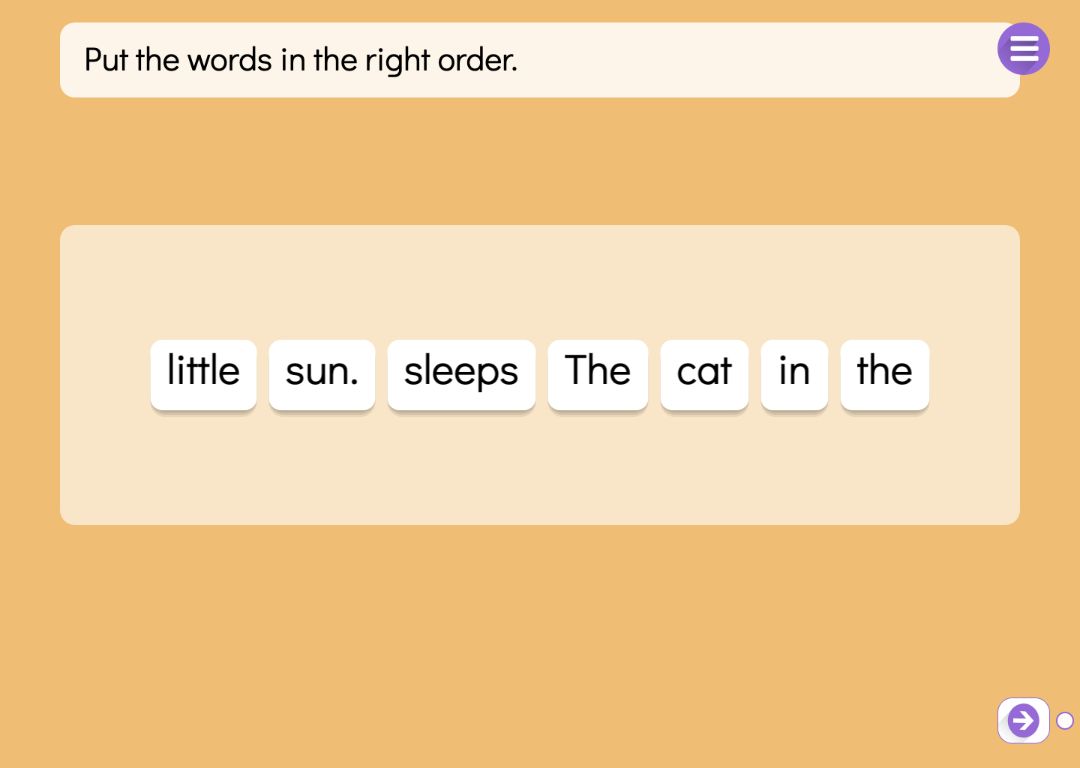
In a Sentence Order task you type one sentence, and Puro jumbles its words so that none stays in its place. The pupil drags the words around, and from the start of the sentence every word in the right place locks with a tick. The pupil always knows where to carry on. Wrong moves are not marked; there is only an unfinished sentence.
Putting words in order makes pupils read every word and think about which one comes next. Capital letters and punctuation stay on the words as clues: the capital gives away the first word and the full stop the last. For filling in missing words there are fill in the blank exercises, and for writing a whole sentence they hear, dictation exercises.
Try the exercise
This exercise was made with Puro Editor. Try it yourself – this is exactly what your pupils see.

Stars, another go and the sentence audio
When the whole sentence is in place, the pupil sees a result card without words: one to three stars, depending on how many moves they needed. From the card they can jumble the sentence again and try with fewer moves, or carry on.
You can record yourself reading the sentence or upload an audio file. The audio button stays on screen during the task, so the pupil can listen to the whole sentence as a hint. That way, early readers can build a sentence they have heard.
Choosing the right length
A sentence can be up to 120 characters, and 3–10 words work well. The form counts the words and warns you below three or above ten, because a long sentence gets cramped on a tablet and the words get small. Each page has one sentence, so a longer text can be split over several pages.
Only the order you typed is accepted. Where a sentence could be ordered in more than one natural way — “Yesterday I went home” or “I went home yesterday” — choose a different sentence or let capitals and punctuation guide the pupil.
Word order in a foreign language: Build the Sentence
For language teaching there is a variant called Build the Sentence. The sentence is in the language being learned — French, German or Spanish, say — and pupils practise its word order. You can choose English, Swedish, Finnish, Norwegian, German, French, Italian or Spanish, as long as it differs from the language of the story.
You record the sentence in the language being learned; without a recording it stays silent. You also write its meaning in the language of the story. Pupils never see the meaning, but it means that only the instruction and the meaning are translated with the story, while the sentence being learned stays as it is.
When the task is done
On every task page you decide what happens once the sentence is complete.
- Lock the way forward
- The pupil can move to the next page only after completing the sentence.
- Move on or show a message
- A finished task can take the pupil straight to the next page, or show a message such as “Well done!” and play a sound.
- Hint lamp
- After two moves that do not extend the correct beginning, a hint lamp can appear. Step by step, it shows which word comes next, and at the last step moves the word into place.
How to create this exercise
- Choose Sentence Order as the page type. For a sentence in a foreign language, choose Build the Sentence and the language being learned.
- Write the instruction — “Put the words in the right order.”, for example — and record it if you like.
- Type the sentence exactly as it should read, such as “The cat sleeps on the sunny windowsill.”, and record or upload audio for it if you like. In Build the Sentence, also write the meaning in the language of the story.
- Choose what happens when the task is done, and give the page a background colour or image and, if you like, background music.
Tip: Use the same sentence twice: first with audio, then on the next page without. Hearing it supports early readers, and without the audio pupils have to work out the order from what the words mean and how they are written.
Frequently asked questions
- Is Puro Editor free?
- Yes. Puro Editor is completely free for teachers, including making and sharing sentence building tasks.
- Do pupils need an account?
- No. You publish the task and share the link, and pupils open it in the browser without logging in.
- Does dragging work on tablets and interactive whiteboards?
- Yes. It runs in the browser with nothing to install, on tablets (iPad and Android), Chromebooks, computers and interactive whiteboards. Words are dragged with a finger, a stylus or a mouse.
- Can I set it as homework?
- Yes. Share the link on your learning platform, class page or by email, and pupils do the task at home in their browser.
- What if the words could go in more than one correct order?
- Only the order you typed is accepted, so choose a sentence with one natural order. Capital letters and punctuation stay on the words and help the pupil.
- What happens when a pupil puts a word in the wrong place?
- Nothing special: wrong moves are not marked. The locked words at the start show how far the sentence is right, and the pupil carries on from there. Extra moves show up as fewer stars on the result card.
- Can I use it for teaching foreign languages?
- Yes. In the Build the Sentence variant the sentence is in the language being learned and has its own recording, and the meaning is written in the language of the story. There are eight languages to choose from: English, Swedish, Finnish, Norwegian, German, French, Italian and Spanish.
Subjects: Reading Writing Languages History Programming
Want to make your own sentence building tasks?
Sign up