Word match game: read the word, pick the picture
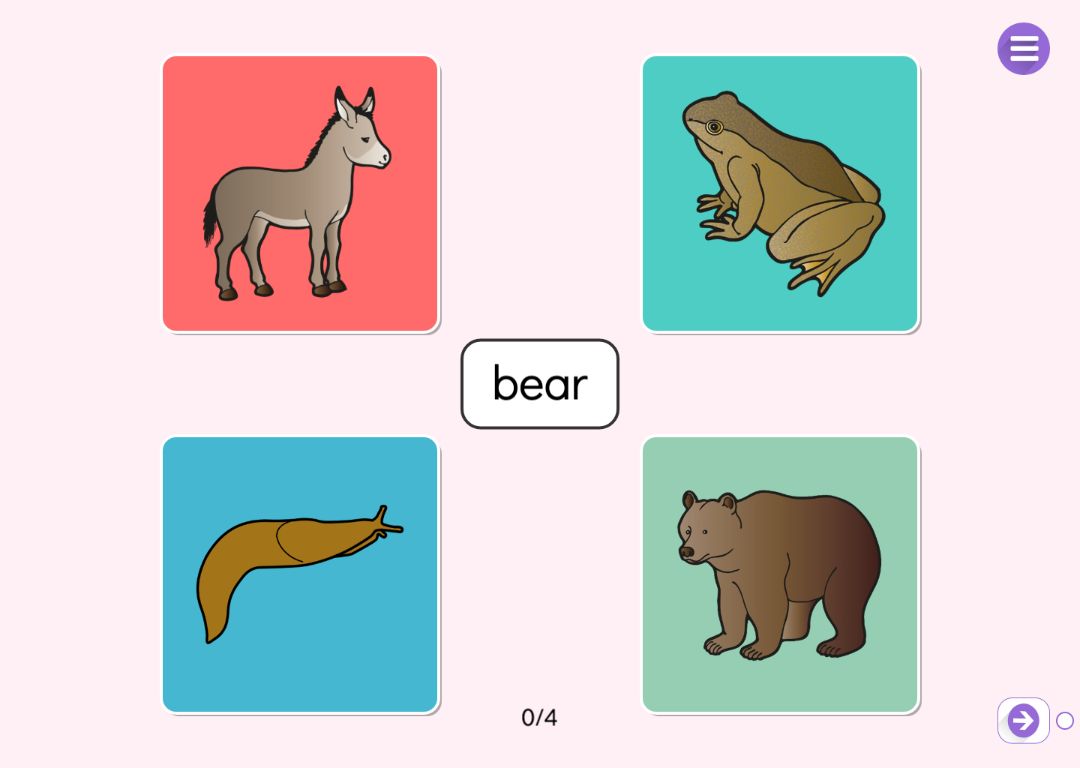
In the word match game a word sits in the middle of the screen with four pictures from the same topic around it. The pupil reads the word and taps the picture that matches it. Right and wrong answers each have their own sound, correct answers add up on a counter, and after a moment a new word appears. At the end the pupil sees how many answers were right and how many were wrong.
The game practises reading words and recognising their meaning. Words and pictures come from Puro’s ready-made word sets, so there are no pictures to find and no words to type: you choose a set, narrow it down to the words you are working on and decide how long the game lasts.
Try the exercise
This exercise was made with Puro Editor. Try it yourself – this is exactly what your pupils see.
Ready-made word sets with pictures
First you choose a word set, animals for example. The form shows the words of the set with their pictures in the language of the story, and you can untick the words you do not want in the game. At least four words must stay, because every round shows four pictures from the same set.
No word comes up again until all the chosen words have been asked. The words appear in the language of the story, and if a word has no translation, it is shown in English.
Rounds and target
Two numbers decide how long the game lasts.
- Pictures in total
- How many words the pupil is asked. If you leave it empty, the rounds are unlimited and the game ends when the target is reached.
- Correct answers to finish
- Once the pupil gets this many right, the game ends and the summary appears. A new page starts with 10 pictures and a target of 6, and the form warns you if the target is higher than the number of pictures.
- Show the right answer
- With this setting on, the right picture is also highlighted after a wrong answer, so the pupil sees straight away what the word meant.
How word match differs from other word activities
Puro Editor has several activity types for vocabulary. In word match the pupil reads one word at a time and recognises it from a picture.
- Memory game
- In a memory game the pairs are hidden under tiles, and pupils also have to remember where they were. In word match every option is in view, and the focus is on reading the word.
- Draw & match
- In Draw & match the teacher builds the pairs, and the pupil connects all of them on one page. In word match the words and pictures come from ready-made sets and are asked one at a time.
- Word search
- In a word search pupils hunt for words in a grid of letters. In word match the word is already there, and the task is to understand what it means.
When the game is done
The game is done when the target is reached or all the pictures have been shown. You decide what happens then.
- Lock the way forward
- The pupil can move to the next page only after finishing the game.
- Move on or show a message
- A finished game can take the pupil straight to the next page, or show a message such as “Well done!” and play a sound.
How to create this exercise
- Choose Word Match as the page type.
- Choose a word set and narrow it down to the words you want to practise. At least four words always stay in.
- Set how many pictures the pupil is shown and how many correct answers it takes to finish. Decide whether the right picture is highlighted after a wrong answer.
- Choose what happens when the game is done and, if you like, add background music.
Tip: Keep only the words you are working on right now. With fewer words, each one comes up more often during the game and gets more practice, and the options on screen are already familiar to the pupil.
Frequently asked questions
- Is Puro Editor free?
- Yes. Puro Editor is completely free for teachers, including making and sharing word match games.
- Do pupils need an account?
- No. You publish the game and share the link, and pupils open it in the browser without logging in.
- Does the word match game work on tablets and interactive whiteboards?
- Yes. It runs in the browser with nothing to install, on tablets (iPad and Android), Chromebooks, computers and interactive whiteboards. Pictures are picked with a tap or a mouse click.
- Can I set it as homework?
- Yes. Share the link on your learning platform, class page or by email, and pupils play at home in their browser.
- Can I add my own words or pictures?
- No. Word match words and pictures come from Puro’s word sets, and you choose which words of a set are included.
- Which language are the words in?
- The language of the story. If you make the story in English, pupils read the words in English. If a word has no translation in the story language, it is shown in English.
Subjects: Reading Languages Science and geography
Want to make your own word match game?
Sign up