Rhythm exercises: listen, then play it back
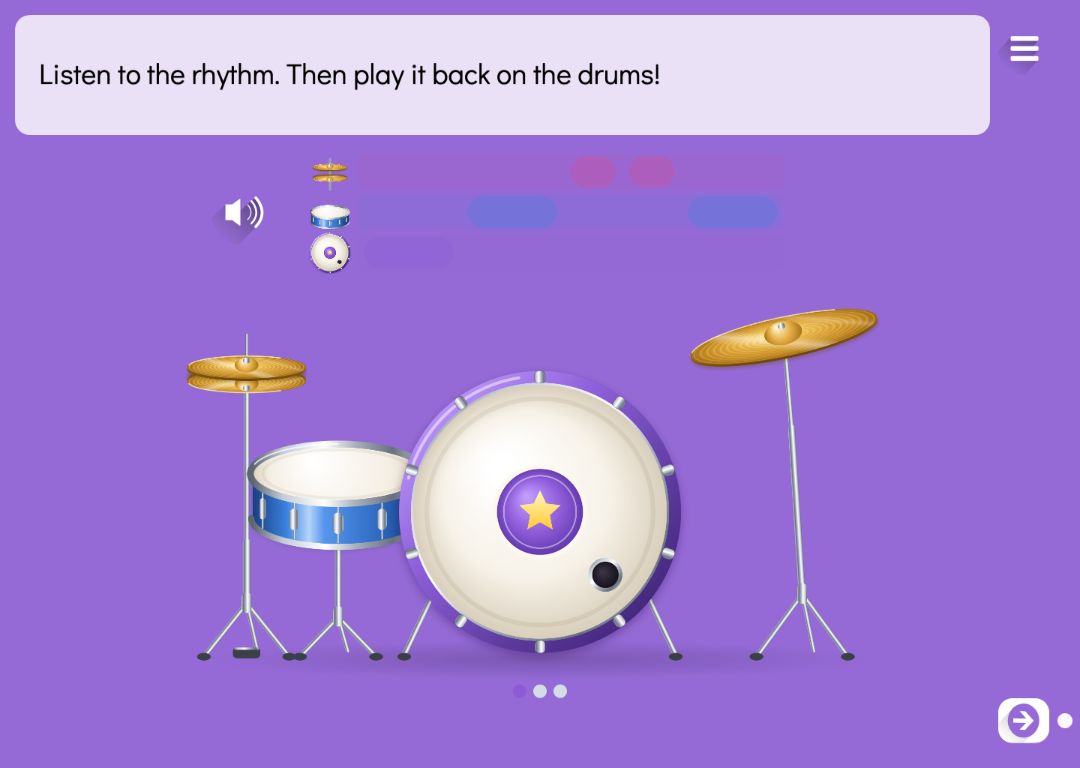
In a rhythm exercise Puro plays a rhythm and the pupil plays it back on a drum kit on the screen. The rhythm is shown as a row of bars, with no words or notation: a long bar is a long note and a short bar a short one. The bars light up as the rhythm sounds, and each hit the pupil makes lights the next bar.
You write the rhythms with ta, ti and taa buttons, or take them from the beginning of a song. The check is about the rhythm, not the tempo: a pupil may play a little slower or faster, as long as the long and short notes keep their proportions. Pupils can practise melodies in the same story on an instruments page.
Try the exercise
This exercise was made with Puro Editor. Try it yourself – this is exactly what your pupils see.
How a rhythm exercise works
- Listen
- The exercise starts when the pupil first taps it. Puro then plays the rhythm, and the speaker button plays it again.
- Play
- The pupil hits the parts of the drum kit: bass drum, snare, hi-hat or cymbal. Once there have been as many hits as the rhythm has notes, the rhythm is checked.
- Feedback
- A rhythm played right turns green and the next one begins. If it goes wrong, the row shakes and the rhythm plays again, so the pupil can try again straight away.
Rhythms from ta, ti and taa, or from a song
You write your own rhythms with the buttons ta (one beat), ti (half a beat) and taa (two beats). The form shows the rhythm as the same bars the pupil sees. A rhythm has 2–12 notes, and a page can have up to eight rhythms, played one after another. With more than one rhythm, a row of dots shows the pupil which one they are on.
Alternatively, choose a song such as Twinkle, Twinkle, Little Star, Are You Sleeping, Brother John? or Happy Birthday to You. The rhythm is then taken from the lengths of its first notes, up to eight. The tempo can be slow, normal or fast.
A drum for every note, and clapping
- Any drum
- By default only the rhythm counts: the pupil may hit any part of the kit.
- Each note on its own drum
- When you choose to give each note its own drum, you change a note’s drum by tapping it in the form. The pupil sees the bars in the drums’ colours, each drum on its own line, and has to hit the right one. A note hit on the wrong drum turns orange.
- Clapping at the microphone
- If you like, a microphone button appears next to the rhythm, and the pupil can clap the rhythm instead of drumming it. Nothing is recorded. If the device is not given microphone permission, the drum kit still works.
When the exercise is done
You decide what happens once every rhythm on the page has been played right.
- Lock the way forward
- The pupil can move to the next page only after playing the rhythms.
- Move on or show a message
- A finished exercise can take the pupil straight to the next page, or show a message such as “Well done!” and play a sound.
How to create this exercise
- Choose Rhythm as the page type.
- Write the instruction — “Listen to the rhythm and play it on the drums.”, for example — and record it if you like.
- Write the rhythms with the ta, ti and taa buttons, or choose a song to take the rhythm from. If you like, give each note its own drum.
- Choose the tempo and whether the pupil may also clap at the microphone.
- Choose what happens when the exercise is done, and give the page a background colour or image.
Tip: Clap and say the rhythm together as a class first — ta ta ti ti ta — and only then let pupils play it on the drums. Once the rhythm is in their bodies and voices, linking the bar lengths to what they hear comes easily.
Frequently asked questions
- Is Puro Editor free?
- Yes. Puro Editor is completely free for teachers, including making and sharing rhythm exercises.
- Do pupils need an account?
- No. You publish the exercise and share the link, and pupils open it in the browser without logging in.
- Does it work on tablets and interactive whiteboards?
- Yes. It runs in the browser with nothing to install, on tablets (iPad and Android), Chromebooks, computers and interactive whiteboards. The drums are played with a tap or a mouse click, and the device needs sound.
- Can I set it as homework?
- Yes. Share the link on your learning platform, class page or by email, and pupils play the rhythms at home in their browser.
- Does the pupil have to keep exactly the same tempo?
- No. The check compares the note lengths with each other, so slightly slower or faster playing is accepted as long as the long and short notes are right. Anything from half to double the tempo counts.
- Is a microphone needed?
- No. The rhythm is played on the drum kit on the screen. Clapping at the microphone is an optional extra that you switch on in the form. The microphone sound is not recorded.
- How is this different from the instruments page?
- A rhythm exercise practises rhythm alone, on a drum kit, without pitch. On an instruments page pupils play notes and melodies on a piano, flute or soundboard.
Subjects: Music and art
Want to make your own rhythm exercises?
Sign up