3D shapes pupils can turn with a finger
Making sense of a 3D shape from a picture in a book is hard: the edges at the back are dashed lines, and the picture cannot be turned. With 3D Solids in Puro Editor, pupils turn a cube, cuboid, prism, pyramid, cylinder, cone or sphere with a finger and see it from every side. Hidden edges are dashed, just as in a textbook, and come into view as the shape turns.
Each page has one task: the pupil looks at the shape and unfolds it, finds its parts, names it, counts its parts, works out its volume from unit cubes or builds a given volume from cubes. Puro suggests an instruction for the task and works out the right answer for the multiple-choice tasks from the shape itself. For 2D shapes there is the geoboard, and for converting measures, units of measurement.
Try the exercise
This exercise was made with Puro Editor. Try it yourself – this is exactly what your pupils see.
Six tasks with 3D shapes
You choose the task at the top of the form. Puro updates its suggested instruction and the answer options to match, but an instruction you have written yourself stays as it is.
- Look and turn
- The pupil explores the shape from every direction. If you like, a button opens the shape into its net and folds it back: a cube opens into a cross, and a cylinder rolls out into a rectangle and two circles. A sphere has no net.
- Find the parts
- The pupil taps the edges, vertices or faces. Each part found stays marked, a wrong tap flashes orange, and once everything is found the shape turns green. For faces, you can ask for one shape only, such as triangles or rectangles.
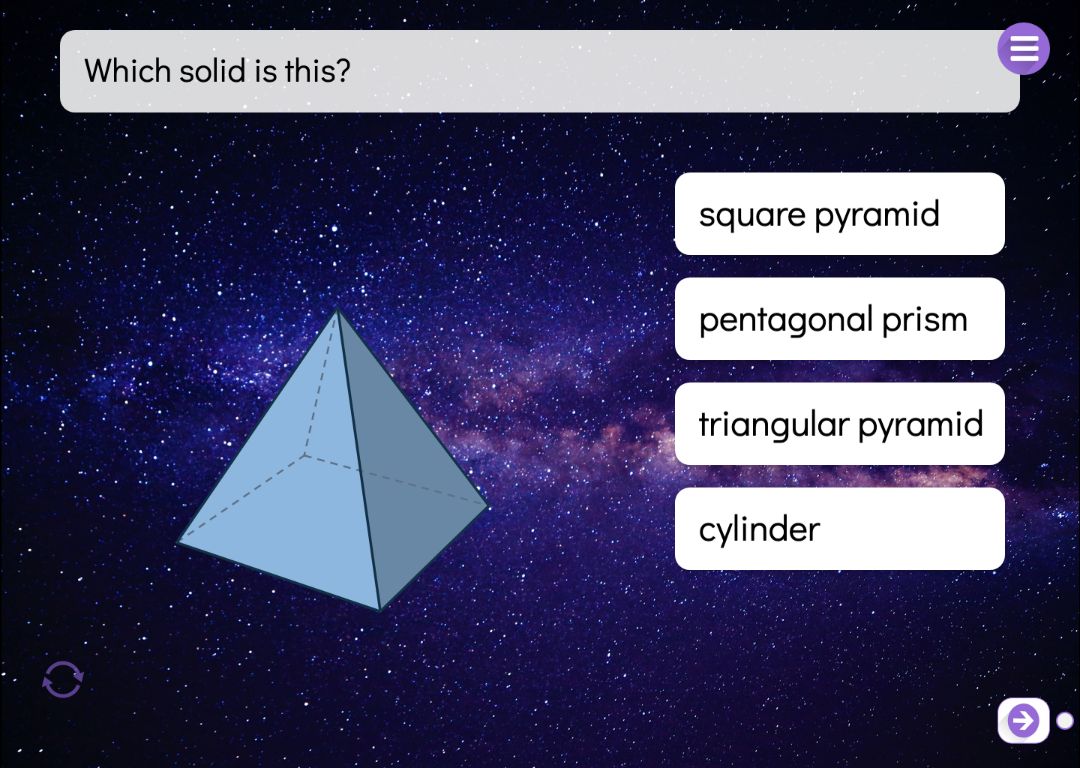
- Name the solid
- The shape is on the left and four names are on the right. The pupil taps the right one.
- Count the parts
- How many edges, vertices or faces does it have? The pupil picks from three numbers, and can turn the shape to count the hidden parts too.
- Volume
- A cube or cuboid is shown with its measurements and unit cubes. Alongside the right volume, the options include typical mistakes such as the area of the base or the sum of the measurements.
- Build
- The pupil builds a given volume from cubes: tapping the floor or the top of a stack adds a cube, and tapping the side of a cube removes it. The check button shows whether the build is right. You can require a cuboid or accept any build with the right number of cubes.
Measurements, units and unit cubes
There are ten shapes to choose from: cube, cuboid, triangular, pentagonal and hexagonal prism, triangular pyramid, square pyramid, cylinder, cone and sphere. For a cube you set the edge length, and for a cuboid the width, depth and height, each from 1 to 8. The unit can be mm, cm, dm or m.
A cube or cuboid can be shown built from unit cubes, and the measurements can be shown next to it, such as “4 cm”. In the build task you set the volume (1–200 cubes), the size of the floor and the tallest stack. You can also stop the shape from turning when you want pupils to work from a single view.
By year group
Schemes of work move at different speeds, so treat this as a rough guide.
- Year 1–2
- Look and turn, then name the solid: get to know cubes, cuboids, pyramids, spheres, cylinders and cones by turning and naming them.
- Year 2–4
- Faces, edges and vertices: first Find the parts, then Count the parts.
- Year 5–6
- Volume from unit cubes and from measurements, including units (cm³), and nets with the unfold button. In the build task pupils discover that cuboids of different sizes can share the same volume.
When the task is done
In the find, count, name, volume and build tasks you decide what happens once the pupil has finished.
- Lock the way forward
- The pupil can move to the next page only after completing the task.
- Move on or show a message
- A finished task can take the pupil straight to the next page, or show a message such as “Well done!” and play a sound.
- Hint lamp
- In the name, count and volume tasks, a hint lamp can appear after two mistakes and guide the pupil to the right answer step by step.
How to create this exercise
- Choose 3D Solids as the page type and choose what the pupil does: look and turn, find the parts, name the solid, count the parts, volume or build.
- Check the instruction. Puro suggests one for the task, and you can edit it (up to 120 characters) and record or upload audio for it.
- Choose the shape and its settings: measurements and unit, the parts to find, unit cubes, visible measurements, the unfold button and turning. For the build task, set the volume, the floor size and the tallest stack.
- For the multiple-choice tasks, check the answer options. Puro works out the right answer, and you can edit the wording or generate new options.
- Choose what happens when the task is done, and give the page a background colour or image and, if you like, background music.
Tip: Ask pupils first to estimate from a textbook picture how many edges the shape has, then check by turning it in a Find the parts task. The gap between the estimate and what they find shows which hidden edges they missed, and leads to a good discussion about how to look at a 3D shape.
Frequently asked questions
- Is Puro Editor free?
- Yes. Puro Editor is completely free for teachers, including making and sharing 3D shape tasks.
- Do pupils need an account?
- No. You publish the task and share the link, and pupils open it in the browser without logging in.
- Which devices can pupils turn the shapes on?
- It runs in the browser with nothing to install, on tablets (iPad and Android), Chromebooks, computers and interactive whiteboards. The shape is turned by dragging with a finger, a stylus or a mouse.
- Can I set it as homework?
- Yes. Share the link on your learning platform, class page or by email, and pupils do the task at home in their browser.
- Do I have to work out the answers myself?
- No. Puro counts the edges, vertices and faces and works out the volume, then turns them into answer options. You can still edit the wording and choose the right answer yourself.
- How are the parts of curved shapes counted?
- A cylinder has three surfaces (two bases and the curved surface), two edges (the rims of the bases) and no vertices. A cone has two surfaces, one edge and one vertex, and a sphere has one surface. If your scheme counts them differently, edit the answer options or use the Name the solid task for curved shapes.
Subjects: Maths Science and geography
Want to make your own 3D shape tasks?
Sign up